Working Wings- A Residential Transition Service
Inspiration and Story Elements
This video story is built upon all of the other assignments in this course in an effort to describe and market a new service I am interested in pursuing and one in which I have had some experience.
I wanted the images to portray three general areas which are seniors aging in place and individuals facing daunting challenges with reorganization or declutterization. The last area would be small projects requiring assistance.
The audio is intended to align with each of the categories and the ambient sound will fill in the gaps.
I began with gathering footage from projects we have completed using the video on my camera. I then used my surface to record video from current projects and existing sites. I recorded all of the audio on my surface. I imported all of this directly into Premier and created bins to categorize the images.
Technical and Design Process
The tools that I used in Premier included the mark-in, mark-out tool and the razor tool. The track-select forward tool was very useful to keep files that I want to keep together and move all at one time. The Effects Control was used in every clip to either size appropriately or scale.
I have selected several audio files, but I still haven’t settled on one to use for the final draft. I have also not settled on the final image, but I am leaning towards images of hands or hugs.
When I went to export, I had the same problem that prohibited me from submitting a previous assignment and found that it is a common bug within Premier and that I was in a mutual, frustrated company. The fix that I found was creating another sequence, copying all of my tracks into that sequence, scrubbing the tracks and saving under a different file name. I was then able to successfully export.
Storyboard
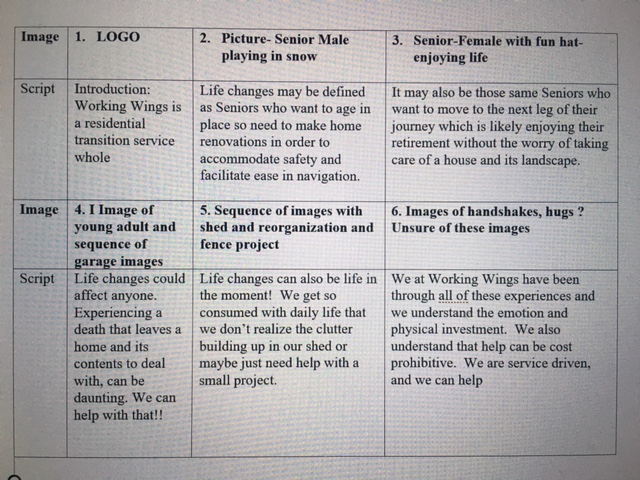
I am still unclear about how to use transitions and change colors. I will need to try a few different variations.
Self-Critique
Some recommendations that I received were to make the transitions between images smoother and to add a music track. Other recommendations included adding a credit or title page at the end of the video to explain who edited the video and possibly add the link to my web-page for more information. Additional recommendations were to better highlight the before and after images and I missed appropriately sizing some photos so those definitely need to be fixed.
I plan to add a musical track as well need to improve both audio and video transitions. I plan to use effects and will explore more YouTube videos as I have definitely been challenged with these techniques.
The scale technique will help me re-size the photos for a better fit.
I will also be making changes to the final image to include some type of credit reference. Finally, I will review the video in its entirety to see how I might improve the overall story and display.
 Residential Transition
All the shots of garages packed with tools and assorted “stuff” definitely brought flashbacks to my own parent’s garage and the difficulty of transitioning them into a senior living apartment. There’s a bucket of nails that we still can’t get my Dad to part with, even though he’s an apartment dweller now. Your narration is very clear, you have a nice speaking voice. Both your video and your audio transitions are choppy, I am sure as you add in the background sounds and video effects those will smooth out significantly. All of the imagery seems like the “before”, it would be good to see some “after” images as well – a tidy or empty garage, a cleaned-up yard, the elderly folks relaxing while the youngsters do the work. Also, you should be able to use the Scale effect to enlarge some of those photos and clips that don’t currently fill the whole frame.
LikeLike
Thank you very much Angela! I appreciate the input and will definitely apply the advice. I’m honestly struggling with applying transitions so will spend more time on YouTube to see if I can get it. I also missed the photos needing scaling so thank you for calling that out! Thanks again!
LikeLike
A pleasure to be working with you again :). Very informative video and proper use of pictures to match the audio. I like the Working Wings picture in the introduction because it immediately helps explain the concept. The use of images mixed with video helps to create a personal connection. Good use of photos displaying a cluttered garage to help paint a picture of what Working Wings helps support and the immense effort needed during times of transition.
Some recommendations are to make the transitions between images smoother by experimenting with effects in Adobe Premiere. I learned a bit about video effects by watching additional tutorials on YouTube. In terms of audio production within videos, I’ve noticed other students using music in their videos, and that could possibly add value to your project if the appropriate music is selected. Another recommendation is to insert a credit or title page at the end of the video to explain who edited the video and where we can learn more information about Working Wings. Between 1:09-1:20 the audio continues to play but, the screen is black. This could be an excellent place to re-insert the Working Wings image from the intro or add the link to your webpage for more information. Great start!
LikeLike
Awesome! Thank you for the feedback. I know I need to improve the transitions, but I’m honestly struggling to do it appropriately. I have used YouTube to some degree, but your encouragement reminds me that I may not have found the right ones. I do want to add music, but honestly haven’t found a track that seems to work so am hopeful tonight’s search will be fruitful. I like the idea of adding a credit page and re-inserting the Working Wings image. Thanks so much for taking the time to offer this!
LikeLike